“Why do you need a vector file if my logo already looks perfectly clear on my computer?”
This is a question we sometimes hear during custom apparel trim development.
The confusion is understandable. A high-resolution image may look sharp on a screen, but that does not necessarily mean it is suitable for manufacturing. For printed labels, silicone logos, TPU patches, and other custom accessories, manufacturers need accurate outlines, dimensions, and editable design elements that can be translated into production specifications.
The difference is not simply the file format. It is whether the artwork contains usable vector paths and enough technical detail for the manufacturing process.
What Is a Vector Diagram, and Why Is It Different From an Image?
A vector diagram, or more commonly in graphic design, vector artwork, is created using mathematically defined paths, curves, points, and shapes rather than a fixed grid of pixels.
This is why vector graphics can generally be resized without losing edge sharpness.
By comparison, common image formats such as JPG and PNG are raster graphics. They consist of individual pixels. When enlarged beyond their original resolution, the edges may become blurry or appear pixelated.
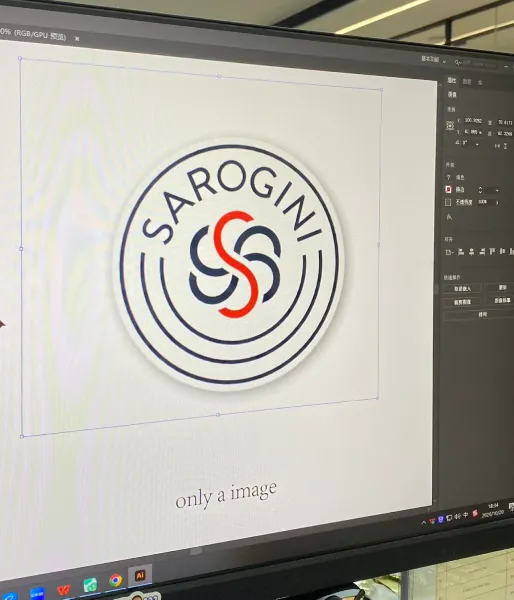
Here is a simple comparison:
| Besonderheit | Vector Artwork | Raster Image |
|---|---|---|
| Basic structure | Paths, curves, and shapes | Individual pixels |
| Resizing | Can scale without losing edge sharpness | May become blurry when enlarged |
| Editing | Individual paths and shapes can be adjusted | Editing individual details can be difficult |
| Common formats | AI, EPS, SVG, vector PDF | JPG, PNG, BMP |
| Manufacturing preparation | Suitable for many precision design and production workflows | May require tracing or redrawing first |
For example, a logo saved as a high-resolution PNG may look excellent at its original size. However, if a manufacturer needs to enlarge it, adjust its outline, or extract a specific shape for mold development, the pixel-based structure can create additional work.
A genuine vector file provides editable paths that make these adjustments much easier.
Why Isn’t an Image Copied Into AI or EPS Automatically a Vector File?
This is one of the most common misunderstandings in artwork preparation.
Adobe Illustrator and other vector design applications can open both vector and raster files. However, placing a JPG or PNG image into an AI or EPS document does not automatically convert the image into vector artwork.
The original image remains pixel-based unless it is manually redrawn or converted into vector paths using an appropriate tracing process.
Zum Beispiel:
- A PNG logo placed inside an AI document is still a raster image.
- A JPG image saved or exported as an EPS file does not automatically become editable vector paths.
- An image processed with automatic tracing may become vector artwork, but the resulting paths can contain excessive points or inaccurate details.
This distinction is important in custom manufacturing.
A file extension tells us how a document is saved, but it does not always tell us whether the artwork inside is suitable for production.
When preparing a logo for manufacturing, we need to check the actual artwork structure rather than relying only on the file name.
Why Do Custom Apparel Trim Manufacturers Need Vector Artwork?
Different manufacturing processes require different types of design information. Vector artwork helps manufacturers prepare these details more accurately.
1. Printed Labels: Accurate Lines and Fine Details
For printed labels, the artwork needs to reproduce the intended shapes, text, and fine details as accurately as possible.
Vector paths make it easier to adjust outlines, resize artwork, and prepare production files without introducing unnecessary pixelation.
This is particularly useful for logos with:
- Kleiner Schriftzug
- Dünne Linien
- Detailed symbols
- Multiple separate design elements
- Precisely defined borders
However, vector artwork alone does not guarantee that every detail can be printed. The actual result also depends on printing technology, substrate, printing resolution, and the minimum line or text size supported by the production process.
2. Silicone Logos: Accurate Shapes for Mold Development
Silicone logos often require molds to form their raised or recessed structures.
The mold-making process depends on accurate outlines, dimensions, and the relationship between different design elements.
A genuine vector file helps engineers identify the intended shape and prepare the geometry for further processing.
For example, if a logo contains multiple raised sections, narrow gaps, or fine lettering, the manufacturer needs to evaluate whether these details can be reproduced reliably in the mold.
An unclear raster image may require manual tracing or redrawing before mold development can begin.
3. TPU Patches: Precise Outlines and Clean Edges
TPU patches are often used for lightweight, modern branding applications where clean outlines and detailed shapes are important.
Vector artwork makes it easier to define the boundaries of the logo and prepare the design for the selected cutting, printing, or heat-transfer process.
For designs with small lettering or complex contours, editable paths also make it easier to identify details that may need adjustment before sampling.
4. Other Custom Trims: Consistent Artwork Across Production
Vector artwork is also useful for embroidery patches, woven labels, PVC labels, leather patches, and other customized accessories.
The exact manufacturing requirements differ by product:
- Embroidery patches: Artwork may need to be digitized into stitch instructions.
- Woven labels: Fine details may need to be simplified to suit the weaving process.
- PVC labels: Outlines and raised sections need to be evaluated for mold production.
- Leather patches: Logo positioning, cutting outlines, and engraving details need to be prepared accurately.
Vector artwork provides a more reliable starting point, but each production process still requires its own technical preparation.
What File Formats Should You Provide?
For custom apparel trim development, AI and EPS are commonly accepted vector formats. SVG and vector PDF files may also be suitable, depending on the manufacturer’s workflow.
| File Format | Typ | Allgemeine Verwendung |
|---|---|---|
| AI | Vector-capable design file | Editable artwork and production preparation |
| EPS | Vector-capable file | Sharing vector graphics between design applications |
| SVG | Vector format | Scalable logos and graphic elements |
| Can contain vector or raster content | Artwork sharing and technical review | |
| PNG | Raster image | Preview images and transparent-background references |
| JPG | Raster image | Reference images and general previews |
One important detail: PDF and EPS files can contain embedded raster images as well as vector elements. Their file extensions alone do not guarantee that the artwork is fully vector-based.
For production artwork, we generally recommend providing:
- AI or EPS files with editable vector paths.
- Text converted to outlines where appropriate.
- Clearly defined colors, preferably with Pantone references when relevant.
- Separate design elements where different materials or production effects are required.
- A reference image showing the intended finished appearance.
If the original font needs to remain editable for future revisions, it can also be supplied separately before the production version is converted to outlines.
What If You Only Have a PNG or JPG Logo?
Not every customer has access to the original vector artwork. That does not mean the project cannot move forward.
There are several ways to handle raster artwork.
Option 1: Request the Original Vector File
If the logo was created by a designer or design agency, ask whether they can provide the original AI, EPS, or SVG file.
This is usually the most reliable option because the original paths and proportions are preserved.
Option 2: Use High-Resolution Artwork as a Reference
If the original vector file is unavailable, provide the highest-resolution image you have.
A clear image with sufficient detail can help the manufacturer’s design team understand the logo and recreate its outlines.
However, the image may still need manual redrawing before production.
Option 3: Redraw or Vectorize the Artwork
Depending on the design complexity, the artwork can be manually recreated or converted into vector paths.
Automatic tracing may work for simple logos with clear outlines and solid colors. More complex designs, small lettering, and irregular shapes often require manual correction.
Before proceeding, the recreated artwork should be checked against the original reference to confirm that the proportions, spacing, and important details have not changed.
How to Prepare Your Artwork Before Sending It to a Manufacturer
A little preparation at the artwork stage can reduce unnecessary revisions during sampling and mass production.
Before sending your design, check the following:
- Confirm the file structure: Make sure the file contains actual editable vector paths rather than only an embedded JPG or PNG.
- Convert text to outlines: This helps prevent font substitution when the file is opened on another computer.
- Check the dimensions: Provide the intended finished size so the manufacturer can evaluate small details at the correct scale.
- Define the colors: Include Pantone references or other agreed color specifications where applicable.
- Separate special effects: Clearly identify raised areas, recessed sections, cutouts, and different material or color regions.
- Provide a visual reference: Include a PNG, JPG, or product mockup showing how the finished logo should look.
Most importantly, artwork should be reviewed at its actual production size. A detail that looks clear when enlarged on a computer screen may be too small to reproduce reliably on a finished label or patch.
Frequently Asked Questions About Vector Artwork
Is a high-resolution PNG the same as a vector file?
No. A high-resolution PNG can look very sharp, but it is still a raster image made of pixels. A vector file contains editable paths and shapes that can be resized without losing edge sharpness.
If I save a JPG as an AI or EPS file, does it become a vector?
No. Changing the file format or placing an image into a vector design application does not automatically convert its pixels into vector paths. The artwork must be traced or redrawn to create genuine vector elements.
Why do manufacturers ask for AI or EPS files?
These formats are commonly used for editable artwork and production preparation. They make it easier to adjust outlines, dimensions, and individual design elements for processes such as printing, mold development, and cutting.
Do I need to convert text to outlines before sending my logo?
For production artwork, converting text to outlines is generally recommended. This prevents missing fonts or unexpected font substitutions when the file is opened on another computer. Keep a separate editable copy if future text changes may be required.
Can a manufacturer recreate a vector file from my PNG logo?
Often, yes. The manufacturer may be able to redraw or trace the image, depending on its resolution and complexity. Simple logos are generally easier to recreate, while detailed artwork and small lettering may require more manual work and confirmation.
Does vector artwork guarantee a perfect finished product?
No. Vector artwork improves the accuracy of design preparation, but the final result also depends on material properties, manufacturing technology, equipment settings, and quality control. Some details may need to be adjusted to suit the selected production process.
Final Thoughts: Good Production Starts With Accurate Artwork
A logo that looks clear on your computer is not necessarily ready for manufacturing. What matters is whether the artwork contains accurate, editable design information that can be translated into the actual production process.
For printed labels, silicone logos, TPU patches, woven labels, and other custom apparel trims, vector artwork helps manufacturers work with more precise outlines, dimensions, and design details.
At QingHan, we recommend providing AI or EPS artwork with text converted to outlines where appropriate. If you only have a PNG or JPG, our team can review the artwork and determine whether redrawing or vectorization is needed before sampling.
A little preparation at the artwork stage can save time, reduce unnecessary revisions, and help the final product match your original design more closely.
Good production starts before the machine starts running.
Über den Autor
——————————————————————————————————————————————

Jason
Verkaufsleiter
Mit umfassenden Branchenkenntnissen und einer verantwortungsbewussten Arbeitsmoral biete ich professionelle Beratung und zuverlässige Unterstützung für jede Zusammenarbeit mit einem Kunden.
——————————————————————————————————————————————